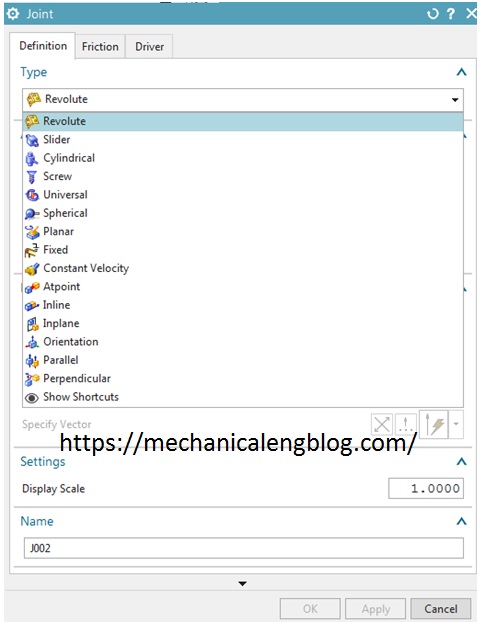
Nx motion joints use to define constrained motions between motion bodies in the mechanism. Joint motion is always defined as the motion of the action body (the first link in the joint definition, also called i marker) relative to the base body (the second link, or j marker).
nx tutorial
nx tutorial synchronous modeling modify face
This tutorial I will guide siemens nx synchronous modeling modify face as move faces, pull faces, resize faces, replace faces, offset faces. I. Nx tutorial synchronous modeling modify face: move faces. Move face command used to move a set of faces and adjusts adjacent faces to accommodate. Where do I find it? From the menu (top border bar): […]
nx assembly add new component and constraints
This tutorial will explain how to add new component to an assembly and constraint between components in a nx assembly drawing. I. General assembly concepts. There are two concepts to creating an assembly structure. + Top-down modeling: Create component parts at the assembly level. + Bottom-up modeling: Create individual models in isolation, then later add […]
siemens nx assembly move component in nx

In the siemens nx assembly, move component command use to copy and move a component in nx assembly. This post I will guide to copy and move component in nx. Where do I find it? From the menu (Top border bar): assemblies -> component position -> move component. From the home tab: assemblies group -> move […]
nx tutorial copy move objects in sketch
In the Siemens nx sketching, This tutorial I will guide copy, edit, move objects in sketch. You must exit the command before you copy, move, or edit the objects. I. Siemens nx move objects in sketch A. Use shortcut key from your keyboard and mouse. + Move curve, points, or dimensions: Drag the points, center of […]
Siemens nx assembly sequence

In the nx assembly, sequence command opens the assembly sequence task environment to control the order of component assembly or disassembly and simulate component motion. Where do I find it? From the menu (top border bar): assemblies -> sequence. From the assemblies tab: general group -> sequence. I. How to create a disassembly sequence? 1. […]