
Have you ever read a magazine or newspaper? If yes, I bet you have seen this, the first letter of a word is magnified, to make it stands out. How to add a drop cap in word document? Drop Cap is one of MS Word’s feature to show you how to do it, very simple […]
microsoft office
How to translate a word document?
Finding and downloading documents is now incredibly easy with the use of the Internet. Moreover, with documents written in foreign languages, the internet also helps us to translate them into the languages we use every day. There are many ways for translation a word document as google translate, google docs, online translation, offline translation software, […]
Remove multiple error spaces between texts in word?
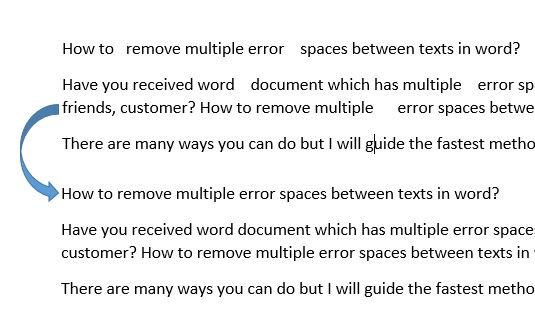
Have you received word document which has multiple error spaces between words from your friends, customer? How to remove multiple error spaces between texts in word? There are many ways you can do but I will guide the fastest method by using find and replace function. 1. Open your defect document. 2. Press Ctrl + […]
How to circle answer in word

When you create test document, may be you have to create circle answer in word. How to do? In word, It is easy and simple, you can use symbol tool or draw a circle at your content. I. Circle answer in word by symbol tool. 1. Click insert -> symbol -> more symbol. 2. In […]
How to increase undo history times in word?
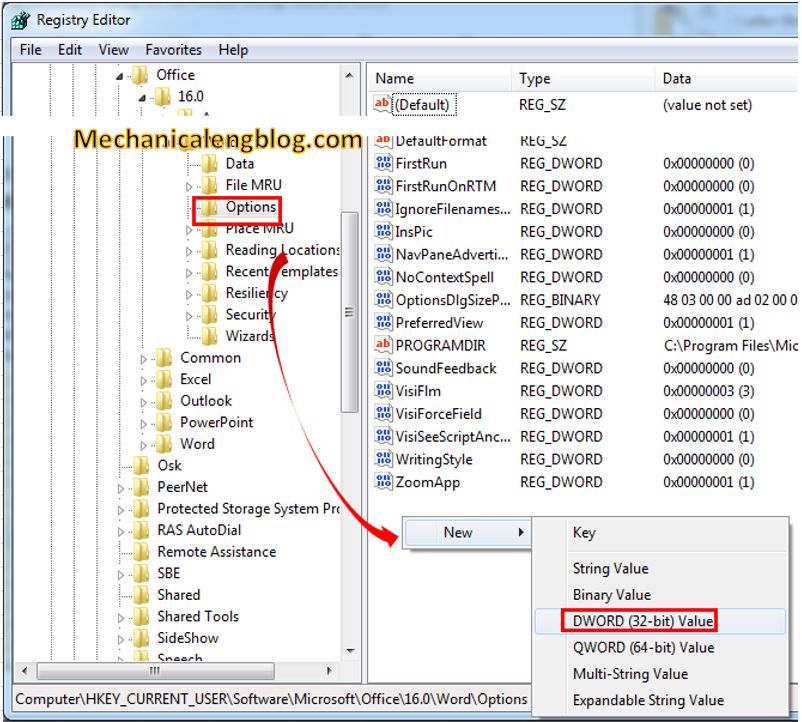
In word, if you make a mistakes, you can undo it to the original before. But the software will limit the amount of times you can undo. How to increase undo history times in word? Can we do? Yes, we can. Please, follow these steps below to do it. I.How to undo in word? + […]
How to combine pictures in word?

In fact, sometimes, you have to merge pictures to create new picture. Can we combine pictures in word? Yes, we can do it without any help of image editor software. In this post, I will example to you merge 2 pictures with canvas option. Also, you can do it with text box and table I. […]