• Skip to main content
  • Skip to secondary menu
  • Skip to primary sidebar

Mechanicaleng blog

siemens nx tutorial & injection molding technology

  • Plastic molding
  • Siemens nx
    • nx modeling
    • nx drafting
    • nx sketching
    • nx assembly
  • Mechanical basic
    • mechanical standard
    • Mechanism video
  • microsoft office
    • microsoft word
    • powerpoint
    • excel tips
  • About me
  • CONTACT ME
Home » autodesk inventor » Inventor modeling tutorials » Autodesk inventor create new point

Autodesk inventor create new point

July 23, 2020 by mechanicaleng blog Leave a Comment

In Autodesk inventor point command use to create new point that is attached parametrically to other objects. use a work point as a reference for creating a work plane, work axis, or other feature in the model.

Where do I find it?

3D model -> work features -> point
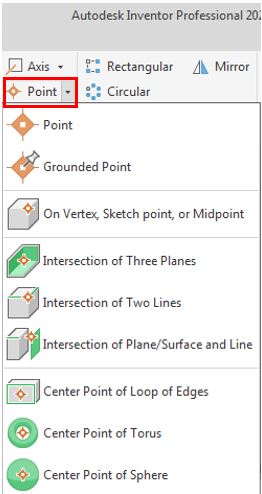
autodesk inventor point command icon

How to create new point in Autodesk inventor?

There are 8 ways to create new point in Autodesk inventor by point command.
1. Grounded point
2. On vertex, sketch point, or midpoint.
Creates a work point on a 2D or 3D sketch point, vertex, or the endpoint or midpoint of a line or linear edge.
3. Intersection of three plane.
Creates new point at the intersection of three work planes or planar faces.
autodesk inventor create new point at intersection of three plane
4. Intersection of two line
Creates new point at the intersection of two lines
5. Intersection of plane/surface and line
Creates new point at the intersection of a planar face or work plane and a work axis or line
6. Center point of loop of edges.
7. Center point of torus
8. Center point of sphere.

Related posts:

autodesk inventor create new axis by normal to plane through pointAutodesk inventor create new axis create new plane commandAutodesk inventor create new work plane. inventor tutorial revolve iconAutodesk inventor revolve tool tutorial Autodesk inventor boundary patch iconAutodesk inventor boundary patch command

Filed Under: Inventor modeling tutorials Tagged With: inventor command

Reader Interactions

Leave a Reply Cancel reply

Your email address will not be published. Required fields are marked *

Primary Sidebar

Recent Posts

  • 10 things to succeed in mechanical engineering
  • what is tapered roller bearings structure
  • What is a flange connection
  • What is a Stainless Steel Flexible Joint
  • Gearbox – What You Need To Know
  • Gearbox Lubrication | 2 types lubricant
  • stainless steel | 4 types and identify
  • Plastic milling – simple but not simple
  • what is spur gear | introduction
  • Mechanical engineering skills from training process

Copyright © 2026 · Magazine Pro on Genesis Framework · WordPress · Log in