
In injection molding process, ejector marks is a concave or a convex on the surface. Samples are stick in the mold under force of ejector system, it will create holes on products. Cause of ejector mark. + Sample doesn’t have a draft angle at boss, rib. It is difficult to push sample out of the […]
Siemens nx assembly sequence

In the nx assembly, sequence command opens the assembly sequence task environment to control the order of component assembly or disassembly and simulate component motion. Where do I find it? From the menu (top border bar): assemblies -> sequence. From the assemblies tab: general group -> sequence. I. How to create a disassembly sequence? 1. […]
siemens nx assembly create an exploded view
In the siemens nx assembly, exploded view command use to create an exploded view in which selected parts or subassemblies are moved apart visually. How do you create an exploded view? I. Create a new explosion. New explosion command creates a new explosion in the work view, in which components can be repositioned to produce […]
Siemens nx modeling create an embossing

In the siemens nx modeling, emboss command use to create an embossing by modify a body with faces made by projecting a section along a vector, with options for end cap location and shape. Where do you find it? From the menu (Top border bar): insert -> design feature -> emboss. From the home tab: feature […]
siemens nx modeling create a boss
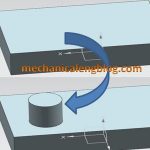
In the siemens nx modeling, boss command use to create a boss on a planar of a solid body. This tutorial I will guide this command. This command is active until nx 11 You are reading a guide how to add a boss in Siemens NX. Click here to read all design feature in Simens NX. […]
Siemens nx modeling create a pocket
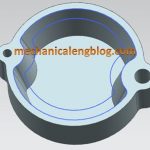
In the Siemens nx modeling, we can create a pocket following: Cylindrical, rectangular, general by pocket command. It uses to remove material from a solid body or modifies a sheet body with faces made by projecting a section along a vector. This command is active until the Siemens nx 11. You are reading a guide how […]